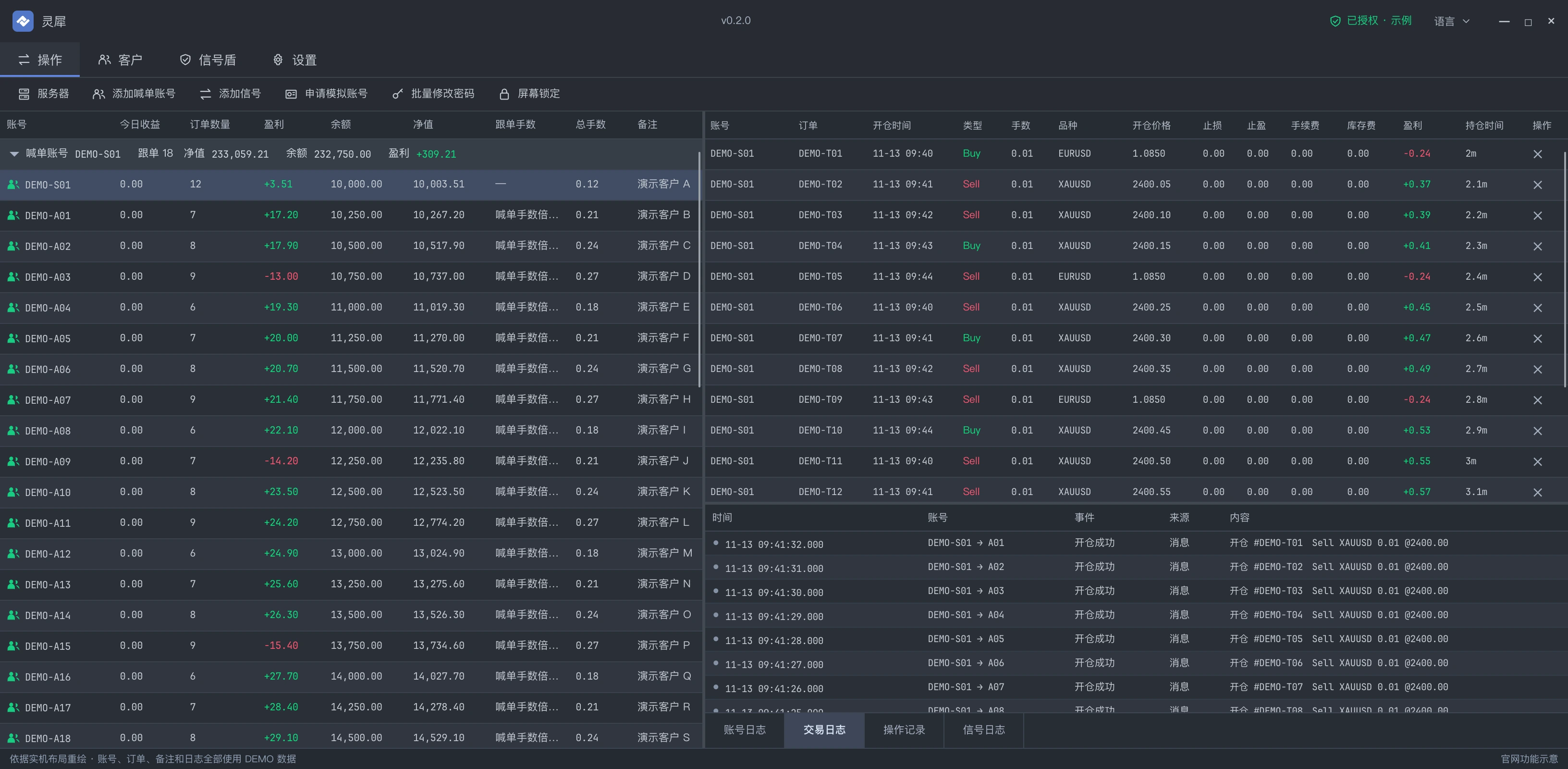
MT4 / MT5 · WINDOWS DESKTOP

Connected signals.
Synchronized trades.LinkSync · MT4 / MT5 copy trading software

From MT4 / MT5 account copying to signal permissions, client profit sharing and trade review. One Windows workspace for every relationship, rule and record.

Core features ready · Preparing for public release

Built for the platforms you already trade on

MetaTrader 4MetaTrader 5Windows 10 / 11Local firstCross-broker copying

DESIGNED AROUND THE WAY YOU TRADE

Everyday work, in one place.

Keep frequent tasks together, from account connections to execution records.

01 / CONNECT

More accounts. Clear relationships.

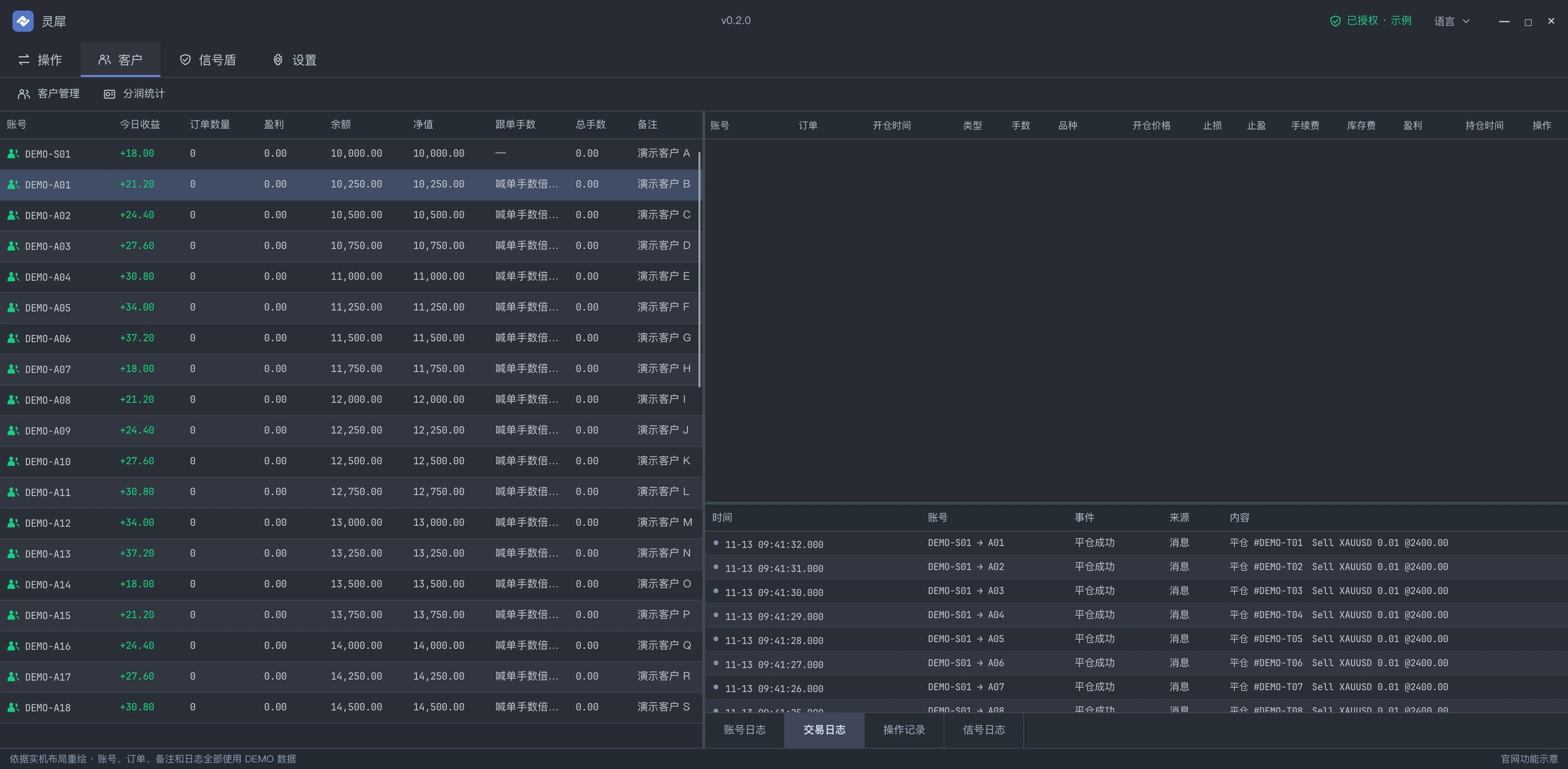
Group followers under their signal accounts. Connect MT4 and MT5 in any combination, with independent settings per pipeline.

02 / CONFIGURE

One signal. Your sizing rules.

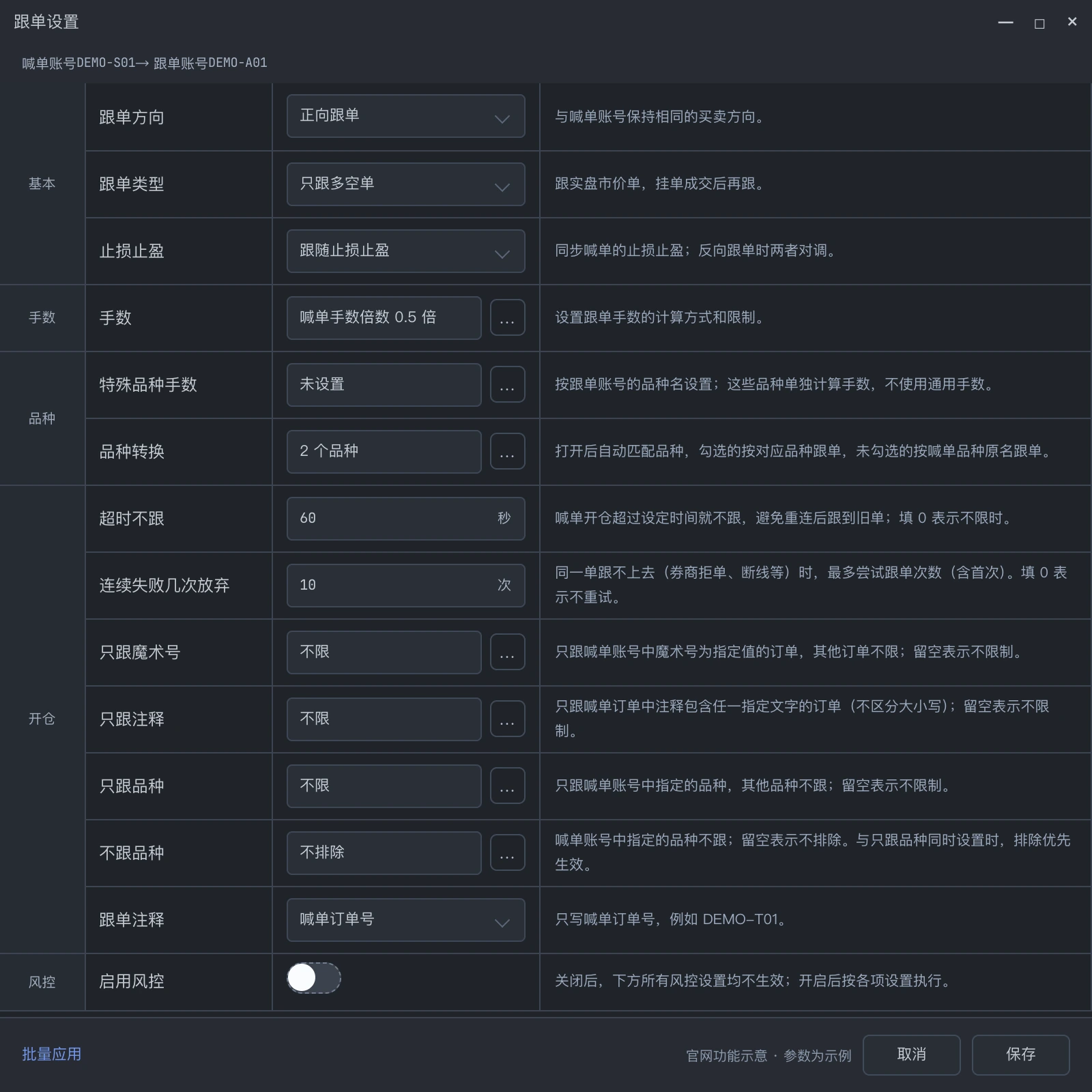
Six modes cover fixed lots, multipliers and signal or follower funds. Configure each relationship separately, or apply settings in batches.

Multiplier× 0.50

1.00 0.50LOT

Configured independently per pipeline
03 / ORGANIZE

From accounts to clients.

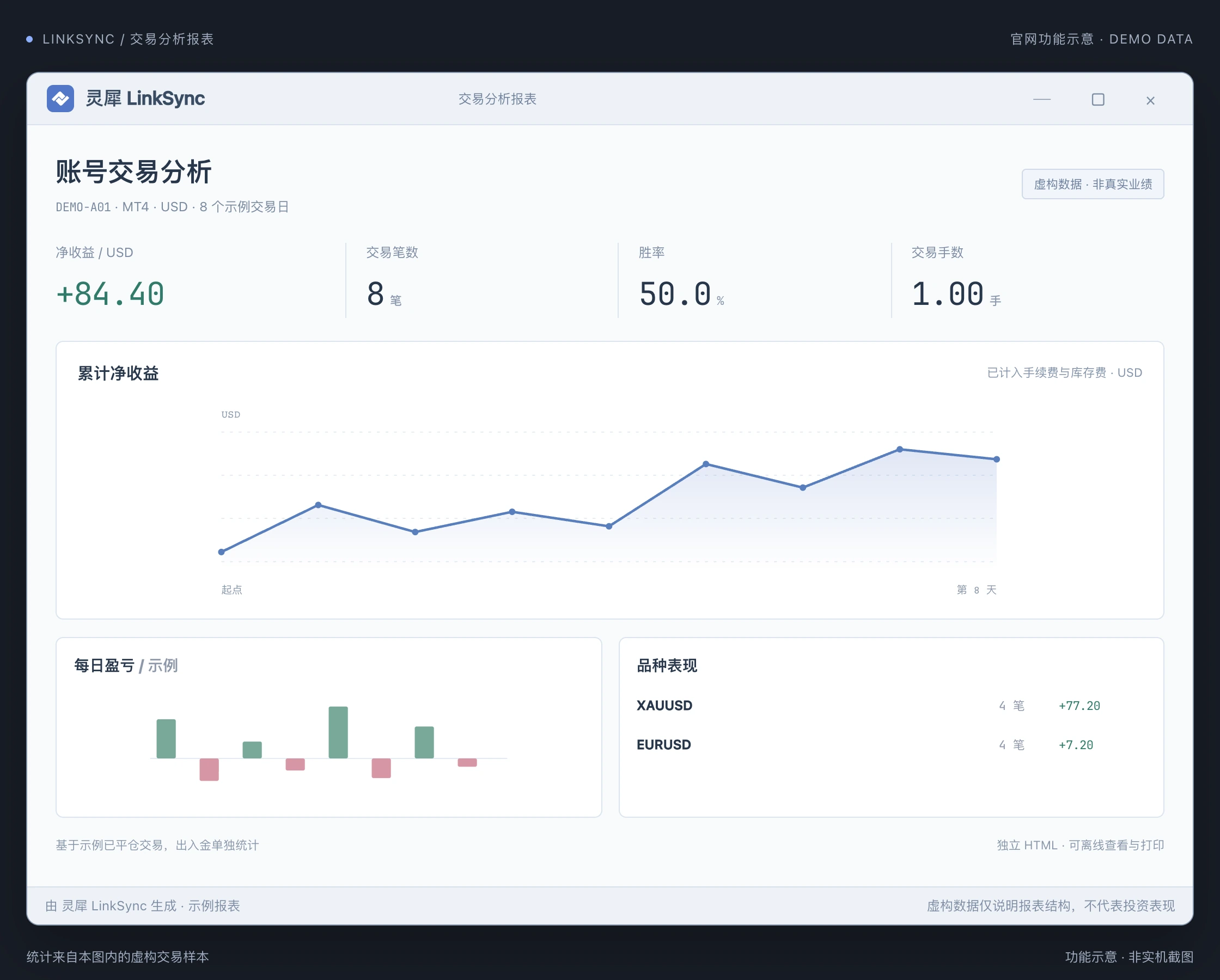
Manage client records and linked accounts together. Review reports by account or client, with default and individual share rates.

A

Client A2 accounts

30%
B

Client B1 accounts

25%
Client & profit-share management

Direct broker connections

Connect to trading servers through APIs, without keeping MT4 or MT5 terminals running.

Bridge symbol differences

Map symbols across brokers, filter instruments, and configure sizing overrides for individual symbols.

Activity you can trace

View account, trading, operation and Signal Shield messages separately. Search historical logs to review execution.

See the product

02 / Getting started

Connect. Configure. Start copying.

Add your accounts, review your rules, and verify your setup before you start.

01

Connect a signal account

Enter your MT4 or MT5 credentials and server. Test the connection before saving the account.

5MT5 · Signal
02

Add followers and configure

Add follower accounts to the signal group. Review lot sizing, copy direction, and symbol mappings.

4MT4 · Follower
03

Verify, then start copying

Verify opening and closing with demo accounts first. Monitor positions and execution activity in the workspace.

Copying
YOUR DATA. YOUR CONTROL.
LOCAL FIRST
Encrypted on deviceAES-256-GCM

03 / Security

Local execution. Purposeful data protection.

Standard copying connects directly from your machine to the broker, with account records in a local encrypted database. Signal Shield also communicates with the central service for authorization and custody.

  • A local workspace

    Account data and copy settings live in the workspace directory. Separate directories keep separate workspaces.

  • Layered credential encryption

    SQLCipher encrypts the database, with a separate AES-256-GCM layer for trading passwords.

  • Local trading, companion services

    Trade instructions go directly to the broker. Signal Shield separately synchronizes permissions, required signal credentials and profit-share data.

  • Lock the screen, keep running

    Manual or idle screen locking protects the interface while connections and copying continue.

ONE TOOL. DIFFERENT WORKFLOWS.

One workspace. Different ways to work.

Organize your own accounts, or manage clients and signals. Two workflows built on the same desktop capabilities.

CORE WORKSPACE

For individual traders

Keep your trading accounts together and configure copy rules for each follower.

  • MT4 / MT5 connections and account groups
  • Independent rules and six sizing modes
  • Positions, categorized logs and offline analytics
View downloads
SIGNAL & CLIENT MANAGEMENT

For studios and small teams

Connect clients, authorized accounts, promoters and share records, with less repeated work across separate lists.

  • Client records, linked accounts and share reports
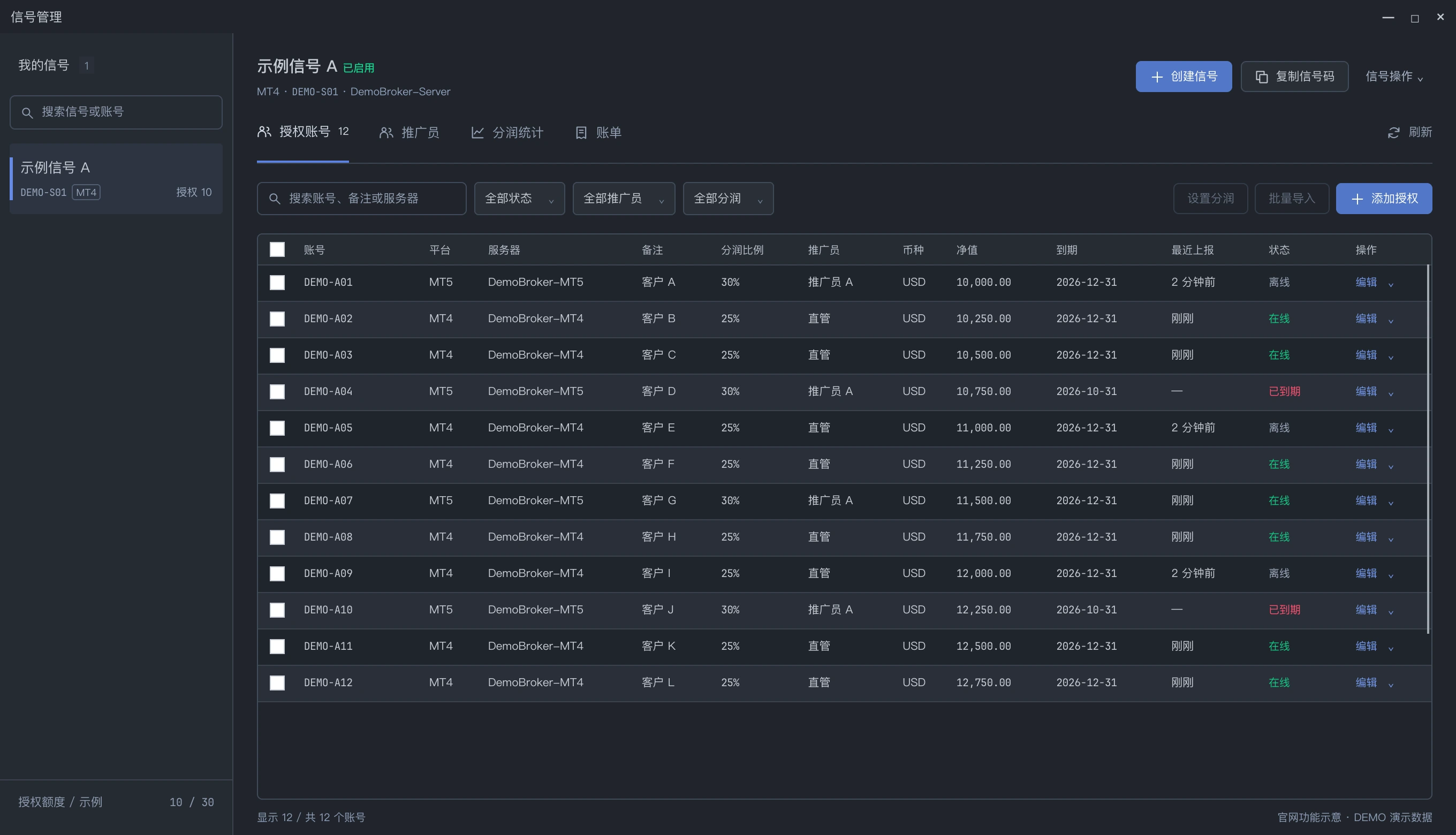
  • Signal grants, promoters and expiry management
  • Manual invoices and payment status records
See signal management
Release status

The desktop app is preparing for release. Public versions and download details will be posted here.

Downloads and commercial licenses follow the release announcement.

FAQ

Questions before you install

Can I download it now?

Core features are substantially complete. Licensing protection and pre-release validation are underway. Once public downloads open, this page will provide the installer and portable package, along with pricing and license scope.

Where is my password stored?

Standard copying stores account credentials in an encrypted local database, with a separate password encryption layer. Signal Shield requires the publisher to submit the necessary read-only signal credentials to the central service, and also synchronizes authorization and share data. Signal custody is not fully offline.

Can I copy between MT4 and MT5?

Yes, in any combination: MT4 to MT4, MT5 to MT5, MT4 to MT5 and MT5 to MT4, across different brokers.

What happens if the connection drops?

The app has reconnection and copy-relationship rebuilding logic, with connection and position states recorded in logs. Gaps after disconnection are not blindly filled; review and confirm any refill yourself.

Can I follow only some symbols?

Yes. Each pipe has its own whitelist and blacklist, per-symbol lot overrides, and a mapping table for symbols your broker names differently.

Can I copy in reverse?

Yes. Each pipe can mirror a signal directly or invert it, independently of every other pipe.

Do I need a VPS?

Run it on your own Windows PC or a Windows VPS. Keep the app, machine and network running while copying. Network latency depends on the connection from that machine to the broker.

How does Signal Shield differ from client reporting?

Client management organizes local clients, accounts and profit-share reports. Signal Shield uses a companion service for signal grants, promoters, profit sharing and invoices. It records invoices and payment status; it does not collect or transfer funds.

LINKSYNC FOR WINDOWS

Choose how you run it.

A Windows desktop app for your PC or Windows VPS. Installer and portable packages are planned for the public release.

Preparing for public release
WINDOWS / X64

Installer

Choose a directory during setup, then launch. A straightforward option for your first installation.

  • Default release includes the runtime
  • Updates preserve settings and data in that directory
Downloads open at public release
WINDOWS / X64

Portable

Extract into its own directory and run. Useful on a VPS or when keeping separate workspaces.

  • Separate directories keep separate data and settings
  • One running instance per directory
Downloads open at public release

Requirements: Windows 10 / 11 · x64. A Windows VPS must support running desktop applications.

Review release notes, download in the background, then choose when to exit and update. Downloading never automatically closes the running app.

Public versions, pricing and license scope will be announced at release.

Read the FAQ
Getting started & system requirements
  1. Prepare a Windows 10 / 11 PC or Windows VPS and the MT4 / MT5 broker accounts you want to connect.
  2. Install or extract into a writable directory, connect signal and follower accounts, and review connection states and symbol mappings.
  3. Configure sizing and copy direction, then verify with demo accounts. Keep your machine, network, and app running while copying.